















Names
Tell it the names you use.
Add the names of your clients, colleagues and products, plus the jargon of your trade. Konote uses your list to recognize them and spell them your way.
Example
For iPhone and Apple Watch
Record on your Apple Watch, iPhone, iPad or Mac. One device is enough, and if you use several, Konote keeps them in sync through iCloud. Nothing new to buy, no subscription, and your recordings only pass through Apple.
7 days free. Then $39.99 once. No subscription.Coming soon to the App Store.
Try it free for 7 days, then pay $39.99 once.
Record with the Apple Watch or iPhone you already have.
Your recordings and notes pass only through Apple. No account to create.
Made for work that happens in conversation
Add your clients’ names once, and the transcript spells them your way.
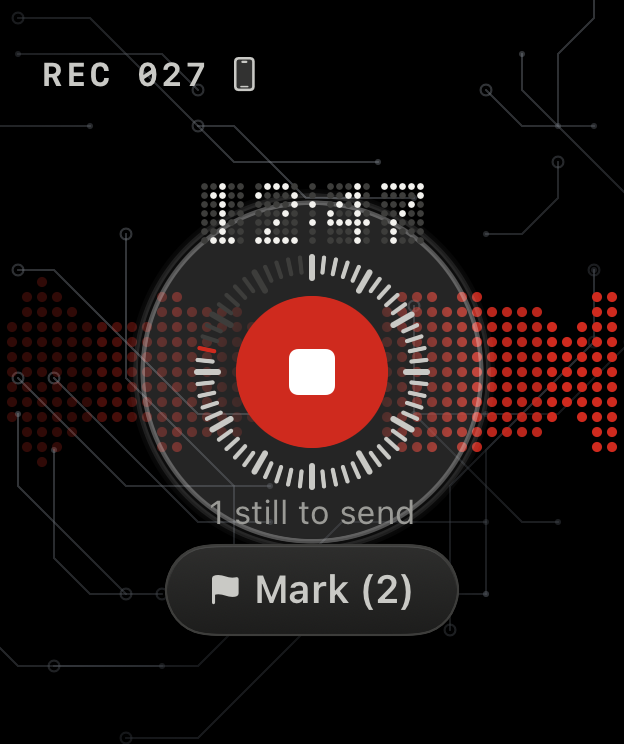
Hands full? Record from your wrist and tap Mark at each issue you find.
Every line has a time stamp, so you can check a quote against the moment it was said.
Before the next one, search what you discussed last time.
Search the whole session and jump to the minute a topic came up.
With your doctor’s OK, keep the explanation to read again at home.
Investor questions, word for word, for your follow-up email.
With your attorney’s OK, reread the advice before you decide.
How it works
Open Konote on your watch and tap the red button. Hear something important? Tap Mark, and it’s flagged in the transcript.
The recording moves to your iPhone. Open Konote there and it turns the audio into a transcript, with a time stamp on every line. The audio isn’t uploaded anywhere to do this.
Search every conversation, ask a question, or start from the draft summary.
You don’t need an Apple Watch. Record on your iPhone, or bring in audio files you already have.
Names
Add the names of your clients, colleagues and products, plus the jargon of your trade. Konote uses your list to recognize them and spell them your way.
Example
Ask
Search every conversation at once, or just ask a question. Konote shows the passages that answer it, with the date and the minute. Tap one to read it in the transcript. Ask needs Apple Intelligence. Keyword search works on any supported iPhone.
Example
What did Dana say about the budget?
Summary
Once a conversation is transcribed, Konote drafts your notes: the decisions, to-dos and numbers. Each point has a time stamp that opens the transcript at that moment, so your follow-up starts from a draft instead of a blank page. Draft summaries need Apple Intelligence: iPhone 15 Pro, iPhone 15 Pro Max or any iPhone 16 or later, with Apple Intelligence turned on.
Example
Kickoff with Harbor & Pine · 47 min
Privacy
Konote downloads the files it needs for transcription, summaries and speaker labels from Apple.
Pricing
$39.99
US App Store price. Purchases and refunds go through Apple.
There's no account, and Konote has no servers that could receive your audio. Recordings and notes live on your devices and are left out of iCloud Backup. To sync between your devices, Konote encrypts them first and then stores them in your own iCloud. Transcription runs on your iPhone. Your recordings and notes go to another app or service only when you send them there: by exporting, sharing, or turning on saving notes to a folder you choose.
Konote downloads the files it needs for transcription, summaries and speaker labels from Apple.
It depends on where you and the other people are. Some states, including California, Florida, Illinois, Massachusetts, Pennsylvania and Washington, require everyone in the conversation to agree. Konote can't make that call for you. The safe habit is to ask everyone before you start. This isn't legal advice.
Konote is free for 7 days, with every feature your iPhone supports. After that, you pay $39.99 once. There's no subscription and no monthly minute limit.
Voice Memos is a good recorder, and it can transcribe too. Konote is built for the work around meetings: one tap on your Apple Watch to record, a Mark button for the important moments, a vocabulary list for your clients' and colleagues' names, search and Ask across every conversation, and a draft of your notes after each one.
Already have recordings? Import the audio files (M4A, MP3 or WAV) and they become searchable too.
Many transcription services process your audio on their own servers and charge a monthly fee, often with a cap on minutes. Konote transcribes on your iPhone and costs $39.99 once, with no monthly allowance, and it records with the iPhone and Apple Watch you already own. The trade-off: Konote is a personal tool. It doesn't join video calls, and it has no shared team workspace.
An iPhone with iOS 26 (iPhone 11 or newer). To record from your wrist, an Apple Watch with watchOS 26. Draft summaries and Ask need Apple Intelligence: iPhone 15 Pro, iPhone 15 Pro Max or any iPhone 16 or later, with Apple Intelligence turned on and set to a language it supports. Recording, transcription and keyword search work on any supported iPhone.
Coming soon to the App Store. Free for 7 days, then $39.99 once.